


Generic vag-com issues


Thread Starter
|
2nd Gear
Joined: Oct 2009
Posts: 712
From: Toronto, Canada
 Generic vag-com issues
I just bought a generic vag-com cable and I'm having trouble getting it to work. I'm using the latest version of VCDS Lite with Windows 7 X64 and I managed to configure the right COM port and got VCDS to recognize the cable and test properly, but whenever I try to access any module it just tries a couple of times and then says it can't connect. I can connect a regular OBDII to USB cable to my car so I doubt the issue is with my car. What could be wrong?

Site Moderator/B5 Tech Guru
Joined: Feb 2010
Posts: 1,745
From: Bay Area, CA
You're still having problems with the com port.
I had the same problem yesterday and got it resolved thanks to this thread: http://www.audizine.com/forum/showth...gh-*Revisited*
I had the same problem yesterday and got it resolved thanks to this thread: http://www.audizine.com/forum/showth...gh-*Revisited*
Thread Starter
|
2nd Gear
Joined: Oct 2009
Posts: 712
From: Toronto, Canada
What part oft he thread helped? The only difference I can see between what I did and what the thread tells me to do is it tells me to use a different version of vagcom.
EDIT: Just realized, that version is what was on the CD that came with the cable, couldn't get it to even start in Win7 but I tried it on Win2000 on WMware and it did the same thing.
EDIT: Just realized, that version is what was on the CD that came with the cable, couldn't get it to even start in Win7 but I tried it on Win2000 on WMware and it did the same thing.
Last edited by Mad Cow; Nov 15, 2010 at 10:48 PM.

Thread Starter
|
2nd Gear
Joined: Oct 2009
Posts: 712
From: Toronto, Canada
I installed XP, tried both the supplied drivers and the latest ones from the ftdi website, no go. It test fine but when I try to access any controller it tries a couple of times and says cannot connect to controller.
Site Moderator/B5 Tech Guru
Joined: Feb 2010
Posts: 1,745
From: Bay Area, CA
Can you please confirm again that you have done this step? The COM port number that you select in device manager must match the COM port selected within VCDS.
I was having the EXACT problem you are, and this was the solution. Beyond that I don't know what to tell you. Sorry.
Step 5:
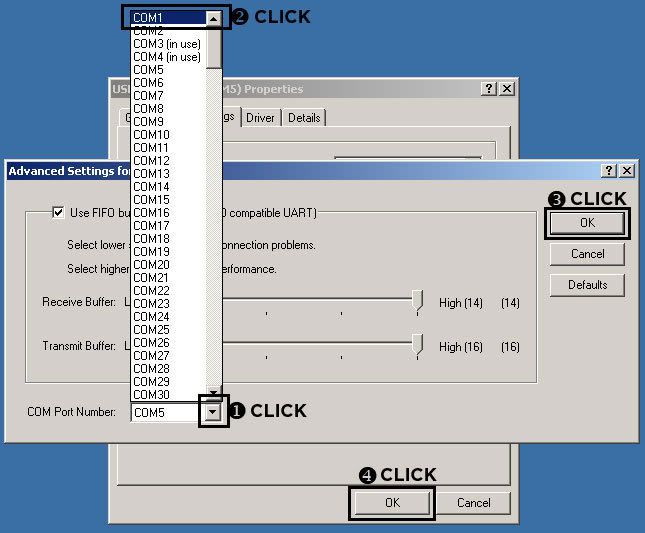
This opens the "Advanced Stettings..." Start by CLICKING on the "COM Port Number:" drop down menu and select "COM1". If COM1 is "in use" select the next highest number, but it HAS to be in the range of COM1-4. Later we'll go into the VAG-COM software options and change it to what we picked here. Finish up by CLICKING on "OK" in the 2 windows.
Notes:
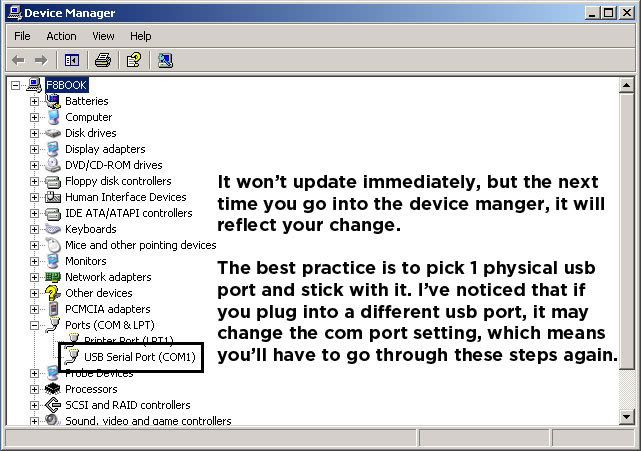
The changes have been made to the COM Port, but I wanted to call attention to the fact that it may not reflect the changes in the Device Manager, until you close and open it again or refresh.
Also, if you plug the cable into another physical USB port, it may change the COM Port. If this is the case, simply repeat these steps.
This opens the "Advanced Stettings..." Start by CLICKING on the "COM Port Number:" drop down menu and select "COM1". If COM1 is "in use" select the next highest number, but it HAS to be in the range of COM1-4. Later we'll go into the VAG-COM software options and change it to what we picked here. Finish up by CLICKING on "OK" in the 2 windows.
Notes:
The changes have been made to the COM Port, but I wanted to call attention to the fact that it may not reflect the changes in the Device Manager, until you close and open it again or refresh.
Also, if you plug the cable into another physical USB port, it may change the COM Port. If this is the case, simply repeat these steps.
Thread Starter
|
2nd Gear
Joined: Oct 2009
Posts: 712
From: Toronto, Canada
Yes I've done that, I've tried different baud rates too, including changing the min baud rate in vagcom to the rate I set in windows.
EDIT: Well I solved it by upgrading to a 908 cable, I tried another 409 cable (what I had before) and it didn't work either, tried a 908 and I had it working within a minute. For the extra $25 that I paid it's well worth it.
EDIT: Well I solved it by upgrading to a 908 cable, I tried another 409 cable (what I had before) and it didn't work either, tried a 908 and I had it working within a minute. For the extra $25 that I paid it's well worth it.
Last edited by Mad Cow; Nov 17, 2010 at 04:29 PM.

