


Replacing Drivers Brake light HOW TO???


Thread Starter
|
1st Gear
Joined: Apr 2008
Posts: 6
From:
 Replacing Drivers Brake light HOW TO???
Hey, just wondering if anyone can walk me through on how to replace my drivers side brake light in a 2003 a6 3.0 I have found forums on older a6's but have not been successfull with mine, thanks to anyone who can help!

Senior Member
Joined: Jan 2008
Posts: 730
From: St. Louis, MO
RE: Replacing Drivers Brake light HOW TO???
Very easy. Ok the info I have is for a 00 2.7t but I'm sure its the same for both. Ok go to the trunk open it up. Next look to your left (drivers side) and you should see a door in the wall. Open that little door/hatch and there should be your jack and what not? (was on mine) remove that and stick your head in there looking at the rear tail light (should be easy to see) Then there should be a black rectangular think with wires plugged into it. Grab the clips holding that to the tail light and remove the rectangular piece and on it should be three lights. Change one and your done! Push and turn to remove... Anyway hope this helps!
Thread Starter
|
1st Gear
Joined: Apr 2008
Posts: 6
From:
RE: Replacing Drivers Brake light HOW TO???
Thanks for the input, ill take a look again, however all my factory panels are removed and all i see is a red plug and my turn signal light so far, heres a pic of my trunk 
[IMG]local://upfiles/52246/842895DE8BD3437CB222283DA5756826.jpg[/IMG]
[IMG]local://upfiles/52246/842895DE8BD3437CB222283DA5756826.jpg[/IMG]
Senior Member
Joined: Jan 2008
Posts: 730
From: St. Louis, MO
RE: Replacing Drivers Brake light HOW TO???
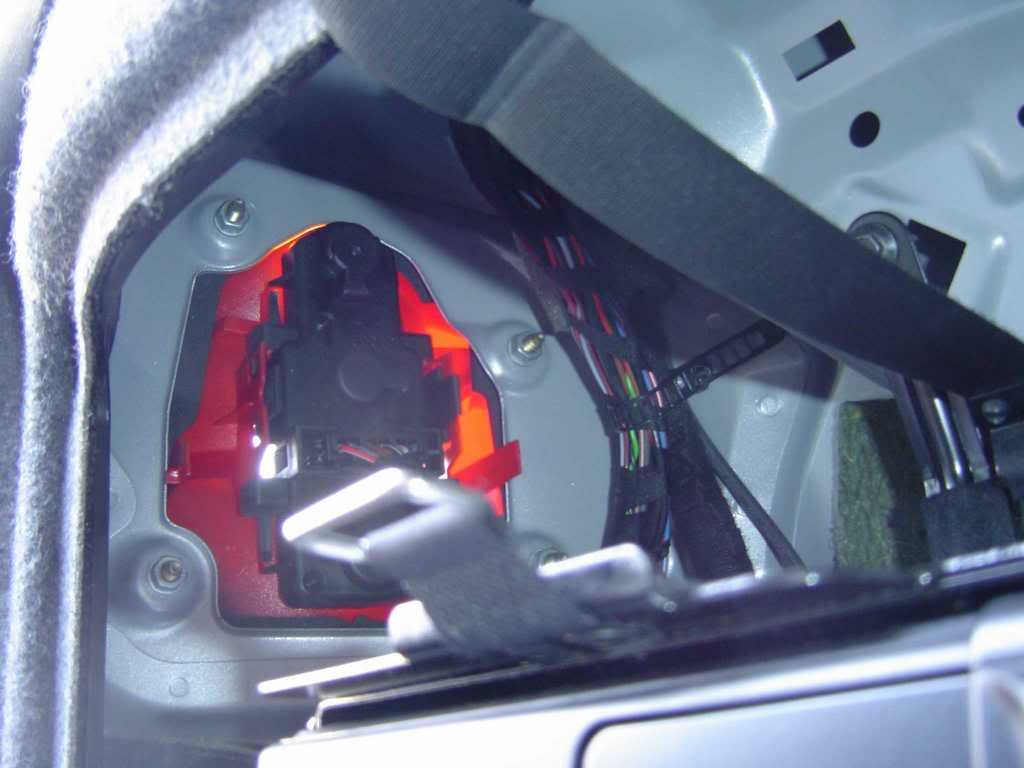
That is what it looks like behind that amp if you look to the left on the driver side... that black part snaps out and lights are on it. Idk what to do with thoes amps though sorry. Trunk looks sick by the way. what else have you done with the car?

1st Gear
Joined: Aug 2007
Posts: 311
From: Calgary Alberta
RE: Replacing Drivers Brake light HOW TO???
Your trunk looks the same as mine, the entire light assembly (all the lights) should be the balck part. Look or feel for the clip holding this assembly in place. Once the clips are located pull the assembly and change the light which needs changing
Thread Starter
|
1st Gear
Joined: Apr 2008
Posts: 6
From:
RE: Replacing Drivers Brake light HOW TO???
Thanks for the help! I have
1-Pioneer AVIC-Z2 DVD\Hard Drive\Nav 1-Diamond Audio 7" Componants 2-Diamond Audio 12" Hex Pro Subs 2-Diamond Audio D61200.1 Amps 2-Diamond Audio D6600.4 Amps 4-Kinetic HC PowerCellBatteries Custom Fiberglass Door Panels Custom Fiberglass Trunk All Monster Cable Wires 2 Way Clifford Security\Remote Start 20" AR Rims\Tires 30% Tint In Channel Vent Visors Rear Spoiler
1-Pioneer AVIC-Z2 DVD\Hard Drive\Nav 1-Diamond Audio 7" Componants 2-Diamond Audio 12" Hex Pro Subs 2-Diamond Audio D61200.1 Amps 2-Diamond Audio D6600.4 Amps 4-Kinetic HC PowerCellBatteries Custom Fiberglass Door Panels Custom Fiberglass Trunk All Monster Cable Wires 2 Way Clifford Security\Remote Start 20" AR Rims\Tires 30% Tint In Channel Vent Visors Rear Spoiler

Thread
Thread Starter
Forum
Replies
Last Post


