


Scratch on MMI display...??


 RE: Scratch on MMI display...??
Maybe you could put a screen protector over it. Some screen protectors for your pocket pc/smartphone will hide scratches and small marks. Who knows if they make any for your device but something to consider. Anti-reflective protectors tend to hide the scratches, ones called crystal clear or whatever don't.
Jeff
Jeff

2nd Gear
Joined: Jan 2005
Posts: 1,391
From:
RE: Scratch on MMI display...??
ORIGINAL: audia6s
Here is the picture of MMI. Obviously, scratch doesnt show up at night time or when NAV is on during the day.
Here is the picture of MMI. Obviously, scratch doesnt show up at night time or when NAV is on during the day.

Thread Starter
|
1st Gear
Joined: Jan 2008
Posts: 257
From:
RE: Scratch on MMI display...??
I am totally with you Kevin (dont feel like driving it bcuz of that...usually take the car out at night when I cant see it  )but that is my backup plan.
I am talking to Audi customer care and also, sales guy said that he'll try talk to CPO manager and see if he can get it replaced. Dont you they should have looked at during certification. I bought mercedes, bmw and lexus certified cars in the past and if I have any issues like this the day after or one week then they take care of it.
I'll fight for it
)but that is my backup plan.I am talking to Audi customer care and also, sales guy said that he'll try talk to CPO manager and see if he can get it replaced. Dont you they should have looked at during certification. I bought mercedes, bmw and lexus certified cars in the past and if I have any issues like this the day after or one week then they take care of it.
I'll fight for it
Thread Starter
|
1st Gear
Joined: Jan 2008
Posts: 257
From:
RE: Scratch on MMI display...??
Couple hundred and they are replacing the MMI display [sm=happybounce.gif]
Saved $$$$
Operations manager was very helpful and worked out the deal with me after some discussion and negotiation.
Saved $$$$
Operations manager was very helpful and worked out the deal with me after some discussion and negotiation.

1st Gear
Joined: Nov 2010
Posts: 4
RE: Scratch on MMI display...??
I think for your car,if your scratch is very deep, I suggest you replacement a new display, now its price is ok.And before you install the display,suggest you to screen protector over it.That will usefully for the new one.
We replacement this MMI Display for many times, sometimes is the display dead. The partnumber of the display is LQ070T5DR02 Sharp 7'' TFT.See the picture in following.
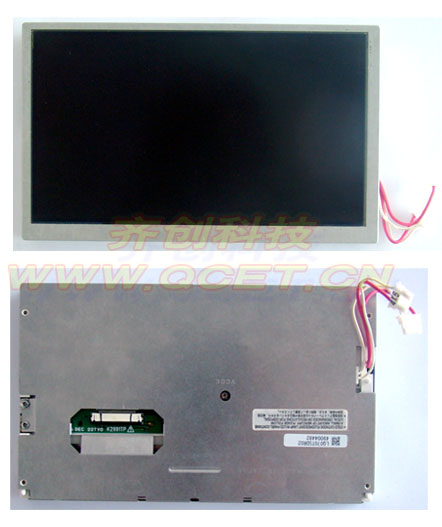
By the way, this display is same as in the Q7,A6,A8,A5,A4, the MMI Display.
We replacement this MMI Display for many times, sometimes is the display dead. The partnumber of the display is LQ070T5DR02 Sharp 7'' TFT.See the picture in following.
By the way, this display is same as in the Q7,A6,A8,A5,A4, the MMI Display.

1st Gear
Joined: Dec 2010
Posts: 11
From: Sicilia - Italy
Thanks in advance.
Roberto
1st Gear
Joined: Nov 2010
Posts: 4
I know this problem. It is the gear problem . It can't open /close well . You just remove it and replacement the gear is ok. This is easy , I think .
1st Gear
Joined: Dec 2010
Posts: 11
From: Sicilia - Italy
Regards, Roberto

1st Gear
Joined: Nov 2012
Posts: 1
I had this problem on my 2009 A4 Cab. After some research, I learned that the scratches are in a coating on the screen. Several sites recommended using an eraser to remove the coating. I did this (using a white block eraser) and it worked perfectly. My screen looks like new!! Just rubbec the eraser with multiple passes vertically and horizontally and then cleaned with a lense cleaner (but any glass cleaner would work).
The coating is meant to protect from scratches, but it will scratch very easily itself. The Nav system screen is fine without the coating as long as you keep sharp objects(and pets) away from the screen.
The coating is meant to protect from scratches, but it will scratch very easily itself. The Nav system screen is fine without the coating as long as you keep sharp objects(and pets) away from the screen.

Thread
Thread Starter
Forum
Replies
Last Post
