


Reliable place to order new key and remote?


2nd Gear
Joined: Apr 2009
Posts: 675
From: Des Moines, IA

hi and thanks for the reply i went to the boro town centre today and popped into a local key cutter he said he could cut me a key for 5 notes so i just need to order a blank key and fob of ebay but he said he doesnt program them is it possible to swap the inners of my fob and transfer in to the new one and does the fob im getting of ebay have to be exactly the same or could i order a newer looking fob sorry for being a pain but really dont know what to do lol ohh and yes the key i have opens the boot and glovebox hope this helps what is fcc id and how do i get the information to see if it is the right key many thanks aidy76

 I am a 3 day old audi owner with one key

2nd Gear
Joined: May 2012
Posts: 1,272
From: Minnesota
So when guys are talking about programing the key, they're just talking about programing the remote part of the fob. The key fob has the immobilizer chip in it, but a US B5 Audi doesn't see it.

1st Gear
Joined: Jul 2013
Posts: 8
I have a 98 A4 which I recently got. Keyfob does not work so I replaced the CR1620. Attempted to reprogram as has been discribed but no success. Not being able to reprogram with new batteries does that mean the fob is non-functional?
Thanks
Thanks
2nd Gear
Joined: May 2012
Posts: 1,272
From: Minnesota
Remote Control Programming (1997 ON)
Procedure
1. Switch Ignition ON and leave the key in the ignition.
2. Mechanically lock the vehicle using the Drivers door using a second key.
3. Using the remote control press the Unlock button once, and the horn willsound once.
4. Wait 6 seconds and press the unlock button once to activate the coding
procedure. The remote control will now be programmed.
NOTE : When performing programming on additional remotes the procedure
is the same, except on the first press, you press the unlock button 2, 3 or 4times for the
different remote.
For example : If programming 2 remotes press the unlock button twice with
a 1 second interval between each press, repeat for 3 and 4 remotes.
5. Switch Ignition OFF.
6. Remove key from ignition and check for operation.
7. The coding procedure can be repeated up to 4 times for additional remotes.
8. The ignition must be switched OFF between programming each remote
control.
Remote Control Erasing (1997 ON)
Procedure
1. Switch Ignition ON and leave the key in the ignition.
2. Mechanically lock the vehicle using the Drivers door using a second
key.
3. Press the remote control unlock button 5 times in 1 second intervals.
A short horn will sound.
4. Wait 6 seconds and press the unlock button once to activate memory
erase.
5. Switch ignition OFF, all remotes are now erased.

2nd Gear
Joined: Jun 2013
Posts: 1,149
From: Cincy
Not to thread jack, but how do you get the FOB apart w/o breaking anything? Mine is not "switch-blading" as it should be. Sometime it does, sometimes it doesn't and it's pissing me off. Has anyone had this problem and been able to diy it? Thanks Guys.
2nd Gear
Joined: May 2012
Posts: 1,272
From: Minnesota
You slide it apart. It's in two pieces and you can see a little spot where you can pry to lift the latch apart, then it slides apart. Then you pry the little 4 ring logo off the half that just holds the key itself, and you'll see a little screw underneath it. Voila!
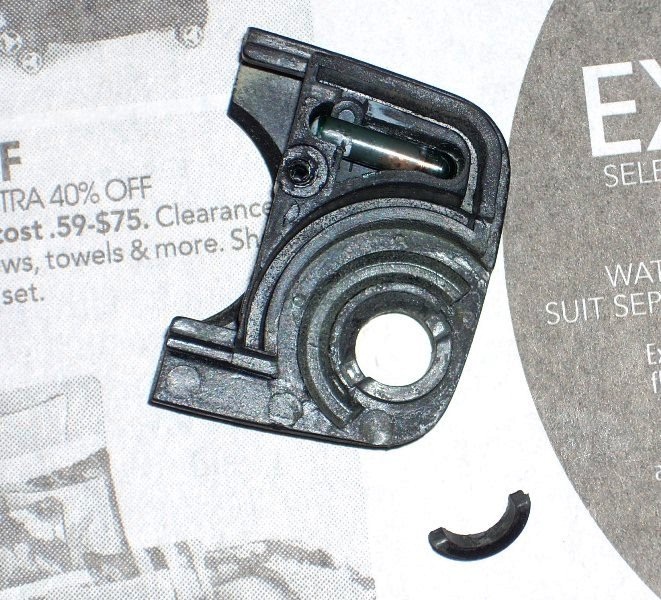
On mine, part of the little plastic that switchblade pivots in was broken. See the pic. This is very small stuff, but with some tweezers and some carefully placed epoxy, I glued it back together. You cannot get epoxy in the circular channel where the switchblade pivots. But if some leaks out, if you wait till its pretty gummy, but not fully hardened, you can scrap it out with a small, jeweler's screwdiver.
Broken:
Glued back together:
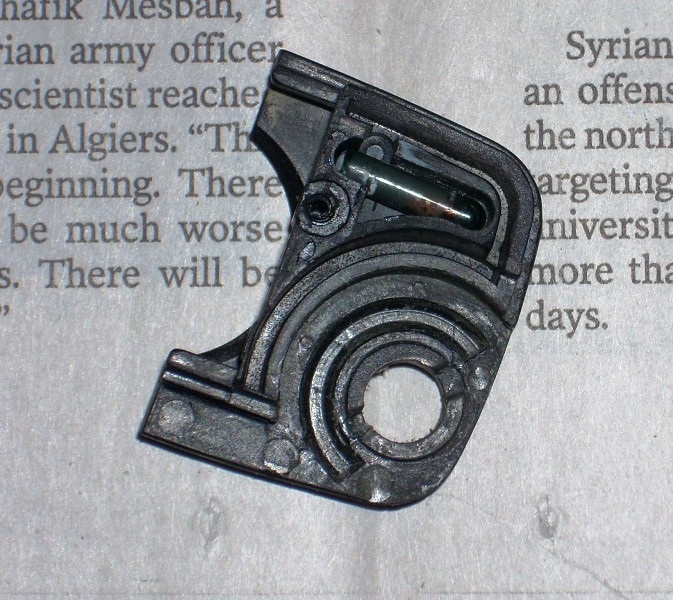
On mine, part of the little plastic that switchblade pivots in was broken. See the pic. This is very small stuff, but with some tweezers and some carefully placed epoxy, I glued it back together. You cannot get epoxy in the circular channel where the switchblade pivots. But if some leaks out, if you wait till its pretty gummy, but not fully hardened, you can scrap it out with a small, jeweler's screwdiver.
Broken:
Glued back together:

1st Gear
Joined: Aug 2013
Posts: 1
 how many original keys needed to program extra key?
you described programming with two keys, but it is not clear where to use blank fob key...., can please specify? :
You'll need two keys (originals?).
1) Open the driver door, turn the ignition switch to on [first orig key], but do not start the car.
2) Close and lock the driver door with the other key (this should be the proper key and not just the valet key - I used the valet key first and wondered why the programming didn't work) [second orig key].
3) Hold down both buttons on the fob for about 5 seconds [on both orig keys]. The lights should flash and the alarm horn may honk.
4) Turn key [second orig key] to unlock the door. Take out key and open the door.
4) Remove the key from the ignition [first orig key] and put in new key[blank fob] and turn ignition switch to ON. Take out key, Close and lock the door with the key [blank fob].
------------------
if the above is correct that means that it is impossible to self program with only one original key...
You'll need two keys (originals?).
1) Open the driver door, turn the ignition switch to on [first orig key], but do not start the car.
2) Close and lock the driver door with the other key (this should be the proper key and not just the valet key - I used the valet key first and wondered why the programming didn't work) [second orig key].
3) Hold down both buttons on the fob for about 5 seconds [on both orig keys]. The lights should flash and the alarm horn may honk.
4) Turn key [second orig key] to unlock the door. Take out key and open the door.
4) Remove the key from the ignition [first orig key] and put in new key[blank fob] and turn ignition switch to ON. Take out key, Close and lock the door with the key [blank fob].
------------------
if the above is correct that means that it is impossible to self program with only one original key...
2nd Gear
Joined: May 2012
Posts: 1,272
From: Minnesota
I'd put it this way:
1) Open the driver door, turn the ignition switch to on [orignalkey], but do not start the car.
2) Close and lock the driver door with the other key (thisshould be the proper key and not just the valet key - I used the valet keyfirst and wondered why the programming didn't work) [new key].
3) Hold down both buttons on the fob for about 5 seconds [youare standing outside the car now, so this is the new key]. The lightsshould flash and the alarm horn may honk.
4) Turn key [new key] to unlock the door. Take outkey and open the door.
4) Remove the key from the ignition [original key]and put in new key[new fob] and turn ignition switch to ON.Take out key, Close and lock the door with the key [new key].
I think if you follow what I said above now, you only need one original key, and one key that is keyed for the lock cylinder on the driver's door. The process programs the radio part of the key. You only need a key in the ignition turning it on, then you sort of lock yourself out of the car while you program the radio part of the new key.

